Share Blog

Monday, June 02, 2014

Multithreading Using C#.net

Multithreading is used to perform multiple tasks at the same time. Tasks with the potential of holding up other tasks can execute on separate threads, a process known as multithreading. Or, it's basically trying to do more than one thing at a time within a process.


Namespace

In .NET, threading functionality is defined in the System.Threading namespace. So you have to define System.Threading namespace before using any thread classes.

using System.Threading;

Starting a Thread

A C# client program starts in a single thread created automatically by the CLR and operating system that is called the main thread, and is made multithreaded by creating additional threads. Here's a simple example and its output.

using System;
using System.Collections.Generic;
using System.Linq;
using System.Text;
using System.Threading;

namespace Threading_example
{
    class Program
    {
        static void Main(string[] args)
        {
            Thread t1 = new Thread(Function2);
           
              t1.Start();
            for (int i=0;i<4;i++)
            {
                Console.WriteLine("Hii");
               // Console.ReadLine();
            }
            Console.ReadLine();
        }


        private static  void Function2()
        {
            for (int i=0;i<5;i++)
            {
              
                Console.WriteLine(" Friends");
                //Console.ReadLine();
            }
        }
   
       
    }

}

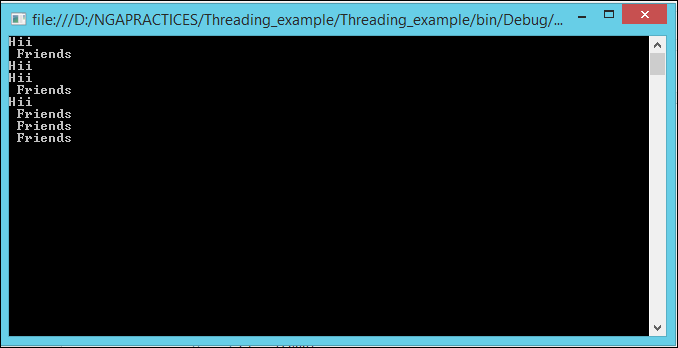
OUTPUT


In the above example, the main thread creates a new thread on which it runs a method that repeatedly prints the string "Friends".Simultaneously, the main thread repeatedly prints the string
"Hii".

Abort a Thread

The Thread class's Abort method is called to abort a thread. Make sure you check the IsAliveproperty before Abort.

           if (t1.IsAlive)
            {
               t1.Abort();
            }
 ---------------------------------------------------------------

using System;
using System.Collections.Generic;
using System.Linq;
using System.Text;
using System.Threading;

namespace Threading_example
{
    class Program
    {
        static void Main(string[] args)
        {
            Thread t1 = new Thread(Function2);
            if (t1.IsAlive)
            {
               t1.Abort();
            }
          
            for (int i=0;i<4;i++)
            {
                Console.WriteLine("Hii");
               // Console.ReadLine();
            }
            Console.ReadLine();
        }


        private static  void Function2()
        {
            for (int i=0;i<5;i++)
            {
              
                Console.WriteLine(" Friends");
                //Console.ReadLine();
            }
        }
   
       
    }

}

OUTPUT

In the above example, The main thread creates a new thread which is stopped by the abort method. The main thread repeatedly prints the string "Hii".

Pausing a Thread

The Thread.Sleep method can be used to pause a thread for a fixed period of time. 

Thread.Sleep()  
---------------------------
using System;
using System.Collections.Generic;
using System.Linq;
using System.Text;
using System.Threading;

namespace Threading_example
{
    class Program
    {
        static void Main(string[] args)
        {
            Thread t1 = new Thread(Function2);
           
           t1.Start();
            for (int i=0;i<4;i++)
            {
                Console.WriteLine("Hii");
                Thread.Sleep(2000);
              
            }
            Console.ReadLine();
        }


        private static  void Function2()
        {
            for (int i=0;i<5;i++)
            {
              
                Console.WriteLine(" Friends");
                Thread.Sleep(6000);
            
            }
        }
   
       
    }

}

OUTPUT


In the above example, the main thread creates a new thread which is paused by the Sleep method for 6000 milliseconds. The main thread is also paused by a Sleep method for 2000 milliseconds.

Thread Priority

The Thread class's ThreadPriority property is used to set the thread's priority. The thread priority can have NormalAboveNormal, BelowNormal, Highest, and Lowest values.
thread.Priority = ThreadPriority.Lowest

-------------------------------------------------------

using System;
using System.Collections.Generic;
using System.Linq;
using System.Text;
using System.Threading;

namespace Threading_example
{
    class Program
    {
        static void Main(string[] args)
        {
            Thread t1 = new Thread(Function2);
            t1.Priority = ThreadPriority.Lowest;
           t1.Start();
            for (int i=0;i<4;i++)
            {
                Console.WriteLine("Hii");
              
              
            }
            Console.ReadLine();
        }


        private static  void Function2()
        {
            for (int i=0;i<5;i++)
            {
              
                Console.WriteLine(" Friends");
             
            
            }
        }
   
       
    }

}
-----------------------------------------

Suspend a Thread

The Suspend method of the Thread class suspends a thread. The thread is suspended until the Resume method is called.

if (t1.ThreadState == ThreadState.Running) 
{
       t1.Suspend();
}

Resume a suspended Thread
The Resume method is called to resume a suspended thread. If the thread is not suspended, the Resume method will have no effect.
if (t1.ThreadState == ThreadState.Suspended) {
       t1.Resume();
} 
--------------------------------------------------------------------
using System;
using System.Collections.Generic;
using System.Linq;
using System.Text;
using System.Threading;

namespace Threading_example
{
    class Program
    {
        static void Main(string[] args)
        {
            Thread t1 = new Thread(Function2);
           // t1.Priority = ThreadPriority.Lowest;
            //t1.Resume();
            //t1.Suspend();
           t1.Start();
            for (int i=0;i<4;i++)
            {
                Console.WriteLine("Hii");
                Thread.Sleep(100);
              
            }
            Console.ReadLine();
        }


        private static  void Function2()
        {
            for (int i=0;i<5;i++)
            {
              
                Console.WriteLine(" Friends");
                Thread.Sleep(50);
             
            
            }
        }
   
       
    }


}


Types of Polymorphism in C#.Net with Example And Basic Polymorphism in C#.NET

Introduction:


Here I will explain what is polymorphism in c#.net with example and different types of polymorphism (compile time & runtime polymorphism) in c#.net with example.


Polymorphism

Polymorphism means many forms (ability to take more than one form). In Polymorphism poly means “multiple” and morph means “forms” so polymorphism means many forms.

In polymorphism we will declare methods with same name and different parameters in same class or methods with same name and same parameters in different classes. Polymorphism has ability to provide different implementation of methods that are implemented with same name.

In Polymorphism we have 2 different types those are

        -   Compile Time Polymorphism (Called as Early Binding or Overloading or static binding)

        -   Run Time Polymorphism (Called as Late Binding or Overriding or dynamic binding)

Compile Time Polymorphism

Compile time polymorphism means we will declare methods with same name but different signatures because of this we will perform different tasks with same method name. This compile time polymorphism also called as early binding or method overloading.

Method Overloading or compile time polymorphism means same method names with different signatures (different parameters)

Example
-----------------------------------------------------------------------------------
public class Class1
{
public void NumbersAdd(int a, int b)
{
Console.WriteLine(a + b);
}
public void NumbersAdd(int a, int b, int c)
{
Console.WriteLine(a + b + c);
}
}
-----------------------------------------------------------------------------------
In above class we have two methods with same name but having different input parameters this is called method overloading or compile time polymorphism or early binding. 

Run Time Polymorphism

Run time polymorphism also called as late binding or method overriding or dynamic polymorphism. Run time polymorphism or method overriding means same method names with same signatures.

In this run time polymorphism or method overriding we can override a method in base class by creating similar function in derived class this can be achieved by using inheritance principle and using “virtual &override” keywords.

In base class if we declare methods with virtual keyword then only we can override those methods in derived class using override keyword

Example
-----------------------------------------------------------------------------------------------
//Base Class
public class Bclass
{
public virtual void Sample1()
{
Console.WriteLine("Base Class");
}
}
// Derived Class
public class DClass : Bclass
{
public override void Sample1()
{
Console.WriteLine("Derived Class");
}
}
// Using base and derived class
class Program
{
static void Main(string[] args)
{
// calling the overriden method
DClass objDc = new DClass();
objDc.Sample1();
// calling the base class method
Bclass objBc = new DClass();
objBc.Sample1();
}
}
-----------------------------------------------------------------------------------------------
If we run above code we will get output like as shown below

Output
Derived Class
Derived Class