Share Blog

Thursday, November 26, 2015

Encryption and Decryption in ASP.NET

Encryption: is the activity of converting data or information into code or a secret key.


Decryption: is the activity of making clear to converting from code into plain text.

Create a Class.cs

using System;
using System.Collections.Generic;
using System.Linq;
using System.Web;
using System.Web.UI;
using System.Web.UI.WebControls;
using System.Security.Cryptography;
using System.IO;
using System.Text;


public class Class1
{
    string Encryptionkey = "987";
    public string Encrypt(string originalText)
    {

        byte[] originalbytes = Encoding.Unicode.GetBytes(originalText);
        using (Aes encryptor = Aes.Create())
        {
            Rfc2898DeriveBytes pdb = new Rfc2898DeriveBytes(Encryptionkey, new Byte[] { 0x49, 0x76, 0x61, 0x6e, 0x20, 0x4d, 0x65, 0x64, 0x76, 0x65, 0x64, 0x76 });
            encryptor.Key = pdb.GetBytes(32);
            encryptor.IV = pdb.GetBytes(16);
            using (MemoryStream ms = new MemoryStream())
            {
                using (CryptoStream cs = new CryptoStream(ms, encryptor.CreateEncryptor(), CryptoStreamMode.Write))
                {
                    cs.Write(originalbytes, 0, originalbytes.Length);
                    cs.Close();
                }
                originalText = Convert.ToBase64String(ms.ToArray());
            }
        }
        return originalText;

    }

    public string Decrypt(string cipherText)
    {

        Byte[] cipherBytes = Convert.FromBase64String(cipherText);
        using (Aes encryptor = Aes.Create())
        {
            Rfc2898DeriveBytes pbd = new Rfc2898DeriveBytes(Encryptionkey, new Byte[] { 0x49, 0x76, 0x61, 0x6e, 0x20, 0x4d, 0x65, 0x64, 0x76, 0x65, 0x64, 0x76 });
            encryptor.Key = pbd.GetBytes(32);
            encryptor.IV = pbd.GetBytes(16);
            using (MemoryStream ms = new MemoryStream())
            {
                using (CryptoStream cs = new CryptoStream(ms, encryptor.CreateDecryptor(), CryptoStreamMode.Write))
                {
                    cs.Write(cipherBytes, 0, cipherBytes.Length);
                    cs.Close();
                }
                cipherText = Encoding.Unicode.GetString(ms.ToArray());
            }

        }

        return cipherText;
    }


       public Class1()
       {
        //
        // TODO: Add constructor logic here
        //

       }
}

Create Default.aspx file

<%@ Page Language="C#" AutoEventWireup="true" CodeFile="Encryption_decryption.aspx.cs" Inherits="Encryption_decryption" %>

<!DOCTYPE html PUBLIC "-//W3C//DTD XHTML 1.0 Transitional//EN" "http://www.w3.org/TR/xhtml1/DTD/xhtml1-transitional.dtd">

<html xmlns="http://www.w3.org/1999/xhtml">
<head runat="server">
    <title></title>
</head>
<body>
    <form id="form1" runat="server">
    <div>
    <table>
            <tr>
                <td>Password</td>
                <td colspan="2">
                    <asp:TextBox ID="TxtPassword" runat="server"></asp:TextBox></td>
            </tr>
            <tr>
                <td>Encryption text=</td>
                <td>
                    <asp:Label ID="lblEncry" runat="server" Text=""></asp:Label></td>
                <td>
                    <asp:Button ID="BtnEncryption" runat="server" Text="Encrypt"
                        onclick="BtnEncryption_Click"  /></td>
            </tr>
            <tr>
                <td>Decryption text=</td>
                <td>
                    <asp:Label ID="lblDecry" runat="server" Text=""></asp:Label></td>
                <td>
                    <asp:Button ID="BtnDecryption" runat="server" Text="Decrypt" Enabled="False"
                        onclick="BtnDecryption_Click"  /></td>
            </tr>
            <tr>
                <td></td>
            </tr>
        </table>

    </div>
    </form>
</body>
</html>


Write in Default.aspx.cs

using System;
using System.Collections.Generic;
using System.Linq;
using System.Web;
using System.Web.UI;
using System.Web.UI.WebControls;
using System.Security.Cryptography;
using System.IO;
using System.Text;


public partial class Encryption_decryption : System.Web.UI.Page
{
    Class1 obj = new Class1();
    protected void Page_Load(object sender, EventArgs e)
    {

    }
    protected void BtnEncryption_Click(object sender, EventArgs e)
    {
        lblEncry.Text = obj.Encrypt(TxtPassword.Text.Trim());
        BtnDecryption.Enabled = true;

    }
    protected void BtnDecryption_Click(object sender, EventArgs e)
    {
        lblDecry.Text = obj.Decrypt(lblEncry.Text.Trim());
    }
}


OutPut


Saturday, November 14, 2015

How to Use Session State in Asp.net

Session State: The session state is used to maintain the session of each user throughout the application. Session allows information to be stored in one page and access in another page and support any type of object. In many websites we will see the functionality like once if we login into website they will show username in all the pages for that they will store username in session and they will access that session username in all the pages.
 Whenever user enters into website new session id will generate for that user. This session Id will delete when he leave from that application. If he enters again he will get new session Id.

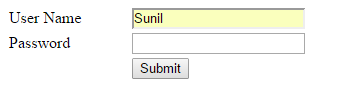
Step 1:-First open your visual studio -->File-->New-->website-->select ASP.NET Empty website -->OK-->open solution explorer -->Add New Web Form -->drag and drop label,Text box and Button control on the form as shown below:-


<%@ Page Language="C#" AutoEventWireup="true" CodeFile="Session_State.aspx.cs" Inherits="Session_State" %>

<!DOCTYPE html PUBLIC "-//W3C//DTD XHTML 1.0 Transitional//EN" "http://www.w3.org/TR/xhtml1/DTD/xhtml1-transitional.dtd">

<html xmlns="http://www.w3.org/1999/xhtml">
<head runat="server">
    <title></title>
    <style type="text/css">
        .style2
        {
            width: 119px;
        }
    </style>
</head>
<body>
    <form id="form1" runat="server">
    <div>
   
        <table style="width:100%;">
            <tr>
                <td class="style2">
                    User Name</td>
                <td>
                    <asp:TextBox ID="TextBox1" runat="server"></asp:TextBox>
                </td>
            </tr>
            <tr>
                <td class="style2" >
                    Password</td>
                <td>
                    <asp:TextBox ID="TextBox2" runat="server"></asp:TextBox>
                </td>
                <td>
                    &nbsp;</td>
            </tr>
          
            <tr>
                <td class="style2" >
                    &nbsp;</td>
                <td>
                    <asp:Button ID="Button1" runat="server" onclick="Button1_Click"
                        style="margin-left: 0px" Text="Submit" />
                    <br />
                </td>
                <td>
                    &nbsp;</td>
            </tr>
          
        </table>
   
    </div>
    </form>
</body>
</html>

Step 2:- Double click on Submit button -->write the following codes which are given below:-

using System;
using System.Collections.Generic;
using System.Linq;
using System.Web;
using System.Web.UI;
using System.Web.UI.WebControls;

public partial class Session_State : System.Web.UI.Page
{
    protected void Page_Load(object sender, EventArgs e)
    {

    }
    protected void Button1_Click(object sender, EventArgs e)
    {
        Session["user"] = TextBox1.Text;
       // Session["pass"] = TextBox2.Text;
        Response.Redirect("Default2.aspx");
        Session.RemoveAll();
    }
}
Step 3:-  No Add a New web Form -->drag and drop label and button control on te web Form as shown below:-


Step 4:- Double click on Logout button-->Write the following codes which are given below:-

using System;
using System.Collections.Generic;
using System.Linq;
using System.Web;
using System.Web.UI;
using System.Web.UI.WebControls;

public partial class Session_State : System.Web.UI.Page
{
    protected void Page_Load(object sender, EventArgs e)
    {

    }
    protected void Button1_Click(object sender, EventArgs e)
    {
        Session["user"] = TextBox1.Text;
       // Session["pass"] = TextBox2.Text;
        Response.Redirect("Default2.aspx");
        Session.RemoveAll();
    }
}

Step 5:- Now Run the application (press F5)-->Fill the required field details as shown below:-

---------------------------------------------------------------------------------------------------------------


Step 6:-  Now click Submit button --> you will see following output-->now click Logout button--> you will redirect to home page(destroy session).


Tuesday, November 03, 2015

Convert String to Title Case (Proper Case), Upper Case, Lower Case in Asp.net

To convert text to proper case, upper and lower case in asp.net open your aspx page and write the following code


<%@ Page Language="C#" AutoEventWireup="true" CodeFile="CovertCase.aspx.cs" Inherits="CovertCase" %>

<!DOCTYPE html PUBLIC "-//W3C//DTD XHTML 1.0 Transitional//EN" "http://www.w3.org/TR/xhtml1/DTD/xhtml1-transitional.dtd">

<html xmlns="http://www.w3.org/1999/xhtml">
<head runat="server">
    <title>Convert String to Title Case (Proper Case), Upper Case, Lower Case in Asp.net</title>
</head>
<body>
    <form id="form1" runat="server">
    <div>
    <b>Enter Text to Change: </b> <asp:TextBox ID="txtinfoDetails" runat="server" Text="hi,welcome to sunil kumar blog"/><br /><br />
<asp:Button ID="BtnTitleCase" runat="server" Text="Title Case"
            onclick="BtnTitleCase_Click"  />
<asp:Button ID="BtnLowerCase" runat="server" Text="Lower Case"
            onclick="BtnLowerCase_Click"  />
<asp:Button ID="BtnUpperCase" runat="server" Text="Upper Case"
            onclick="BtnUpperCase_Click" />
<br /><br />
<asp:Label ID="lblResult" runat="server" Font-Bold="true"></asp:Label>
    </div>
    </form>
</body>
</html>

After completion of adding namespaces you need to write the code like as shown below

using System;
using System.Threading;
using System.Globalization;

public partial class CovertCase : System.Web.UI.Page
{
    protected void Page_Load(object sender, EventArgs e)
    {

    }
    protected void BtnTitleCase_Click(object sender, EventArgs e)
    {
        CultureInfo culinfo = Thread.CurrentThread.CurrentCulture;
        TextInfo txtinfo = culinfo.TextInfo;
        lblResult.Text = txtinfo.ToTitleCase(txtinfoDetails.Text);
    }
    protected void BtnLowerCase_Click(object sender, EventArgs e)
    {
        lblResult.Text = txtinfoDetails.Text.ToLower();
    }
    protected void BtnUpperCase_Click(object sender, EventArgs e)
    {
        lblResult.Text = txtinfoDetails.Text.ToUpper();
    }
}


Demo


Monday, October 26, 2015

Difference Between Abstract Class And Abstract Method in C#

Abstract Class:- 
we use 'abstract' keyword to implement the concept of abstract class. 'Abstract class' can only inherited by other class.we can not create objects of 'abstract class' directly. When any  'abstract class' is inherited by other class then we create the objects of that derived class.We can not create objects of  'abstract class' because methods of  'abstract class' only declare but not define.

    If any class will inherited the  'abstract class' then that derived class will give the body of the  'abstract class'member.
Some characteristics of an  'abstract class' are:-
§  It can not be instantiate directly.
§  It can have abstract members.
§  we can not apply a sealed modifier to it.

Abstract Method:-
when we know what will happen but do not know how it happen ,we just only declare the method but do not define the method. In that case abstract keyword declare with method.
when an instance method declaration includes the modifier abstract,the method is said to be an
 abstract method.
Some characteristics of abstract method are:-

  It can not have implementation.
  Its implementation must be provide in non-abstract derived classes by overriding the method.
  It can be declared only in abstract classes.
  It can not take either static or virtual modifier.
  An abstract declaration is permitted to override a virtual method.


Saturday, October 10, 2015

Difference Detween Value type and Reference type in C#


1.   There are following difference between Value type and reference type on the basis of Storage.
2.     Value type store within stack memory and reference type store within heap memory.
3.     Structure,all primitive data type except string,enum are the example of value type.Class,string,array,delegate,interface is the example of reference type.
4.     Value type directly store values within stack but reference type contains reference object of value which store in heap.
5.     when value type is copy to another value type then actual value is copy,but when reference type is copy to another reference type then reference address of value is copy .
6.     Value type can be initialize with zero(0) and reference type initialize with NULL.